The best coworking billing software for India
How to choose coworking billing software for India — GST, recurring invoices, credit notes, e-invoicing and INR payments, and how ofyse automates it.
In a coworking operation, desks, day passes, meeting-room hire, the security deposit and a mid-cycle upgrade all resolve to the same thing: an invoice that has to be correct, issued on time, and acceptable to your member's accountant. Coworking billing software in India has one job that generic invoicing tools consistently get wrong — producing GST-correct invoices, collecting the way your members actually pay, and repeating both on a schedule without you re-checking each one. This guide covers what to look for, what manual billing really costs you, and how ofyse automates the full cycle.
What coworking billing software India has to do
Billing is where software built for India separates from software adapted to it. A tool designed for the US or Europe can take a card and email a PDF. The gap opens the moment tax, place of supply and local payment rails enter the picture — which, in India, is every invoice.
This is general information, not tax or legal advice — confirm the specifics with a qualified accountant.
GST-correct invoices, not a tax field
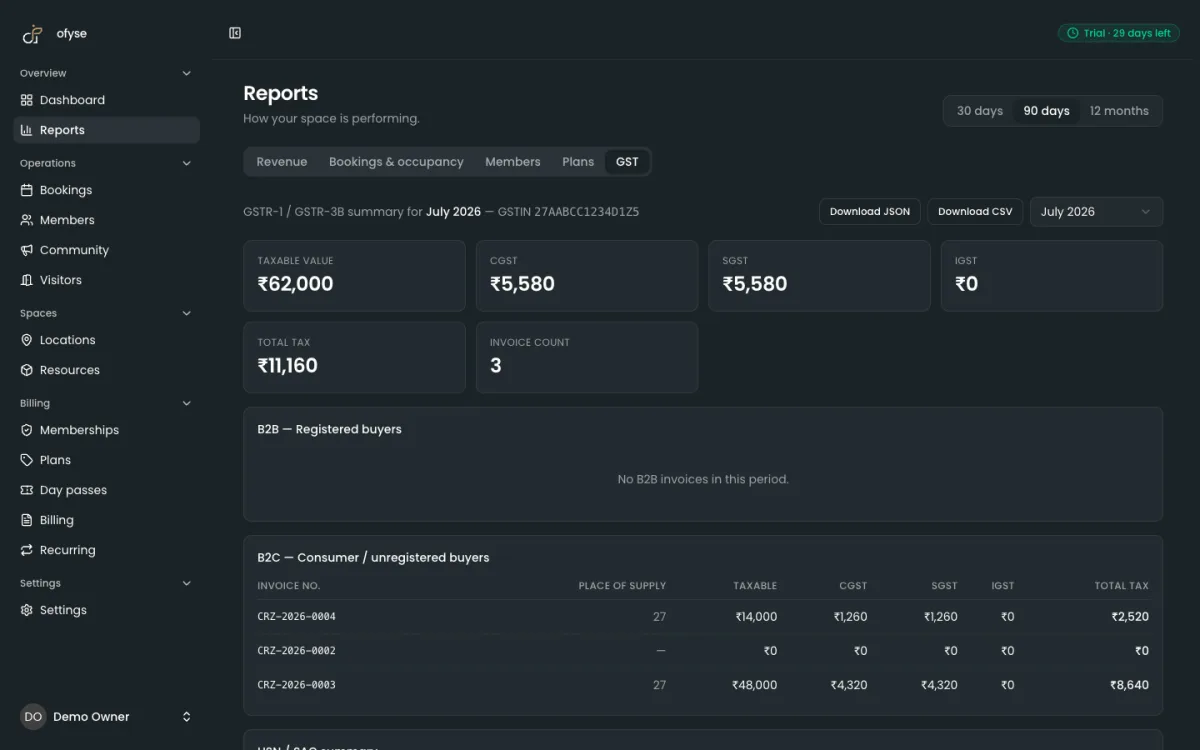
Coworking is treated as a supply of service under GST, and the standard rate widely applied to shared-office services is 18%. A compliant tax invoice needs far more than that percentage. It carries your GSTIN and the member's GSTIN for B2B, a per-line HSN/SAC code (operators commonly use SAC 997212, rental or leasing of non-residential property — confirm the right code with your accountant), the place of supply, and the correct tax split: CGST + SGST for an intra-state supply, IGST for inter-state.
A single "add 18% tax" checkbox does not produce this, and the difference is not cosmetic. Miss a registered member's GSTIN or split the tax wrong, and that member cannot claim input tax credit — which becomes a support ticket at month-end. Billing software worth buying models region-aware tax and prints the full breakdown every time. The GST billing guide for coworking spaces covers the rules in depth, and the coworking GST invoice format guide breaks the invoice down field by field.
Recurring billing with proration
Coworking revenue is recurring by nature. Every seat renews each cycle, and every renewal is a fresh supply of service that carries its own tax. The software has to generate those invoices on a schedule, not wait for you to remember. It also has to handle the messy middle: a member who upgrades from a hot desk to a dedicated desk on the 12th, a downgrade that should apply from next cycle, a plan change that prorates the taxable value rather than the headline price. Get proration wrong and you either overcharge a member or quietly lose margin. Day passes and one-off meeting-room hire sit alongside the recurring seats, so the same system needs to bill both without you keeping a separate tally.
Credit notes and corrections
You will issue a wrong invoice eventually — a plan applied to the wrong member, a discount forgotten, a cancellation after billing. Under GST you do not delete an issued invoice; you correct it with a credit note linked to the original. Billing software has to make that a first-class action, not a manual workaround, so your books and your GSTR data stay consistent and the correction is traceable back to the invoice it adjusts.
E-invoicing (IRN) when it applies
Business-to-business e-invoicing (IRN) becomes mandatory once your aggregate turnover crosses the current prescribed threshold — a limit that has been lowered several times, so check the latest figure with your CA rather than a number you read last year. Above it, B2B invoices must be registered on the government portal to receive an IRN and signed QR code before you issue them. It is far cheaper to run billing software that can produce IRN-ready invoices than to bolt a separate e-invoicing tool onto your process later.
INR settlement with UPI, NetBanking and cards
Cards matter, but in India the default is UPI and NetBanking. Billing software that only speaks international card rails pushes friction onto every member and forfeits the automation that makes recurring billing worthwhile. You want settlement in INR through a gateway that handles the local methods — in practice, Razorpay for UPI and NetBanking alongside cards — and, for recurring dues, support for UPI auto-collect mandates so seat fees are pulled automatically instead of chased each month.
A checklist for choosing billing software
Score any tool against the same short list. The columns that matter for an Indian operator are narrow and specific.
| Capability | Why it matters | Minimum bar |
|---|---|---|
| GST-correct invoices | Members claim input tax credit; a wrong tax split blocks it | Region-aware CGST/SGST vs IGST, per-line HSN/SAC, place of supply |
| Recurring + proration | Every seat renews; mid-cycle changes are constant | Scheduled invoices, automatic proration on upgrade and downgrade |
| Credit notes | You cannot delete an issued GST invoice | Credit notes linked to the original invoice |
| E-invoicing (IRN) | Mandatory above the current turnover threshold | IRN generation without re-keying into a separate portal |
| INR payments | UPI and NetBanking are how India pays | Razorpay for UPI / NetBanking / cards, settling in INR |
| Auto-collect | Chasing dues is the single biggest time sink | UPI auto-collect mandates for recurring fees |
| Deposit + TDS ledgers | Corporate clients deduct TDS; deposits are held, not earned | Separate ledgers, kept out of fee income |
| Clean documents | Every invoice represents your brand | Tidy PDF invoices, ideally white-label |
Anything that fails the first two rows is an invoicing tool with a tax field, not coworking billing software. For a wider view that also weighs bookings, CRM and multi-location alongside billing, the best coworking software in India guide compares the main platforms.
What manual billing actually costs
The case for automation is not abstract; it is arithmetic. Walk the manual cycle for one month.
You export the list of active members and note who changed plan. You calculate proration for each mid-cycle move. You build every invoice with the right tax split, HSN/SAC and place of supply. You generate IRNs for the B2B ones. You email each PDF. You reconcile payments as they arrive across three different rails — UPI, NetBanking and cards — matching each one back to an invoice. You chase the members who did not pay. You issue credit notes for the corrections. Then you do it all again next month.
Put your own numbers on it. Bill 60 members at eight minutes each to prepare, check and send by hand, and that is eight hours a cycle — a full working day every month, before a single failed payment is chased. Double the members and you lose two days. None of that time creates value; it only avoids errors, and it does not even do that reliably, because manual month-end work is exactly where a missing GSTIN or a wrong tax split slips through. One bad invoice rarely stays one problem: it becomes a member email, a credit note and a re-issue, so the cost of a single mistake compounds.
Automated billing collapses the same cycle to review-and-approve. The invoices are already built, the IRNs already generated, the mandates already pulling payment, the exceptions already flagged. You spend the time on the handful of accounts that genuinely need a human, not on the fifty-odd that don't.
How ofyse automates the billing cycle
ofyse runs the whole operation from one workspace — bookings, memberships, members and CRM, billing and payments — so an invoice is generated from the same seat and plan data your members already booked against. There is no export-and-re-import step between selling a seat and billing it, and the India-specific pieces are built in rather than bolted on.
- Invoicing. A GST engine produces GST-correct invoices with HSN/SAC handling and region-aware tax (CGST/SGST vs IGST), applied per invoice.
- Recurring. Seats bill on a schedule, with proration applied automatically on upgrade and downgrade.
- Corrections. Credit notes are issued against the original invoice, keeping your GSTR data consistent.
- Compliance ledgers. Dedicated security-deposit and TDS ledgers stay separate from fee income, and the underlying data stays GSTR-ready for your accountant.
- E-invoicing. ofyse supports IRN generation, so you are not re-keying invoices into a separate portal once the threshold applies to you.
- Collection. Payments run through Stripe, Razorpay and GoCardless — cards, UPI, NetBanking and bank direct debit — across INR, GBP, USD and EUR, with support for Razorpay UPI auto-collect mandates for recurring dues.
- Recovery. Dunning retries and escalates overdue accounts automatically, so only genuine exceptions reach your follow-up list.
- Documents. Every invoice is a clean PDF, with white-label invoices, emails and member portal available.
Pricing follows the same principle as the product. Plans are published transparently — from ₹3,999 to ₹24,999 per location per month, banded by active members — with a 30-day free trial and no card required, so you can size the cost without a sales call. Operators expanding into the UK get the same engine, applying VAT per line item and collecting through GoCardless Direct Debit, with multi-currency billing for anyone invoicing across borders.
How to trial it in 30 days
Billing is one of the few things you can test properly before committing, because you can run a full cycle inside the trial. A focused pass looks like this:
- Start the trial and add one location. Sign up (no card), create a location, and add a couple of resources — a desk type and a meeting room.
- Build a real plan. Create one membership plan and an add-on the way you actually sell them, with the correct price and tax.
- Issue a test GST invoice. Generate an invoice for a mock member with a GSTIN and check the CGST/SGST or IGST split, the HSN/SAC code and the place of supply against what your CA expects.
- Take a UPI payment. Connect Razorpay in test mode and run a UPI or NetBanking payment end to end, so you see the full collect-to-reconcile flow.
- Prorate a change. Upgrade the member mid-cycle and confirm the proration and the tax land where they should.
- Issue a credit note. Correct the invoice and check that the credit note links to the original and your totals stay clean.
- Run dunning. Leave one invoice unpaid and watch the overdue handling retry and flag it.
Thirty days is a full billing cycle. By the end you will know whether the invoices are compliant, whether payment works first time, and whether month-end shrinks from a day's work to a review — which is the only comparison that decides this. See the pricing page for the plan that fits, then start the trial.
Frequently asked questions

Run your space the modern way
Bookings, members, memberships and billing in one workspace. Start a 30-day free trial — no card required.