GST billing for coworking spaces in India
How to invoice coworking members with correct GST in India — the 18% rate, place of supply, input tax credit, and how ofyse automates it.
GST billing for coworking space operators in India comes down to more than adding 18% to an invoice. You are supplying a service, splitting tax between central and state components based on where the supply happens, and handling deposits and recurring seats that each carry their own treatment. This guide covers the rules an Indian operator needs, and how workspace software turns them into invoices you can actually file against.
This is general information, not tax or legal advice — confirm the specifics with a qualified accountant.
Coworking is a supply of service, taxed at 18%
Under GST, coworking is treated as a supply of service, not a sale of goods. Whether you rent out dedicated desks, sell hot-desk day passes, or lease private cabins, you are providing access to space and facilities. That is a service, and it is invoiced as one.
The standard GST rate widely applied to coworking and shared-office services is 18%. That rate typically covers the desk or membership fee together with the facilities bundled into it — internet, reception, utilities, common-area access — when they are sold as a single package.
On the SAC (Services Accounting Code): coworking operators commonly report under SAC 997212, rental or leasing services involving own or leased non-residential property. Services you sell alongside the desk — separately billed meeting-room hire, printing, event space — can fall under different codes. Code selection does not change the 18% rate here, but it does affect how your supplies are reported, so confirm the right codes for your specific service mix with your accountant.
What a GST-compliant invoice must contain
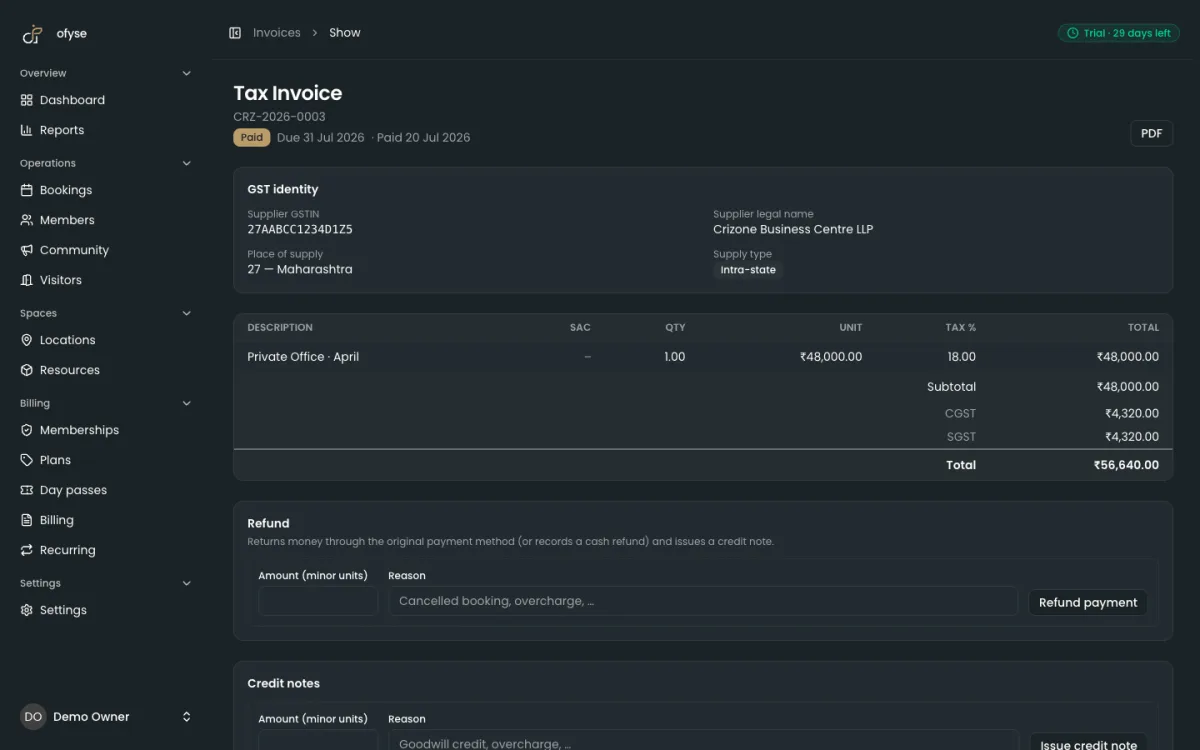
A tax invoice for a desk or membership is not just an amount and a logo. To let your member claim input tax credit, and to hold up under scrutiny, it has to carry a defined set of fields.
| Field | What it means for a coworking invoice |
|---|---|
| Your legal name, address, GSTIN | The operating entity's registered details |
| Invoice number and date | A consecutive, unique serial per financial year |
| Member details | Name, address, and the member's GSTIN if they are registered |
| Description | e.g. "Dedicated desk — monthly membership, June 2026" |
| SAC code | Per line, e.g. 997212 for the seat |
| Taxable value | The fee before tax, net of any discount shown |
| Tax split | CGST + SGST, or IGST, with rate and amount for each |
| Place of supply | The state, where the supply is inter-state |
| Reverse charge | Whether tax is payable on reverse charge (usually not) |
| Signature | Physical or digital signature of the supplier |
Get the tax split wrong, or leave off a registered member's GSTIN, and that member loses the ability to claim credit — which turns into support tickets at month-end. For a field-by-field breakdown with a worked example, see the coworking GST invoice format guide.
Place of supply: intra-state vs inter-state
Place of supply decides whether you charge CGST + SGST (the intra-state split) or IGST (the inter-state charge). The base rule is straightforward:
| Where the supply happens | Tax you charge |
|---|---|
| Same state as your location | CGST + SGST |
| A different state | IGST |
Coworking adds a wrinkle. Because you are providing access to physical space, the supply is commonly treated as one linked to immovable property, so the place of supply is often the location of your coworking space rather than the member's registered address. Under this reading, a member registered in Delhi who uses your Bengaluru location is charged Karnataka CGST + SGST rather than IGST.
This interpretation is widely applied but not settled for every arrangement — virtual-office and registered-address services, for example, can be treated differently. The operator-relevant consequence is the important part: if you charge Karnataka CGST + SGST to a member registered only in Delhi, that member may not be able to use the credit against their own liability. It is worth telling out-of-state members to check the input-tax-credit impact with their accountant before they sign, so it is not a surprise later.
Input tax credit: what members can claim
A GST-registered member can generally claim input tax credit (ITC) on the GST you charge for coworking used in the course of their business. The credit is not automatic — it depends on you as much as on them. The usual conditions:
- A valid tax invoice with all required fields.
- You have actually reported the invoice in your returns.
- It appears in the member's auto-drafted statement (GSTR-2B).
- The service is used for business, not personal, purposes.
The practical takeaway for you: file on time and issue clean invoices. When your returns are late or an invoice is missing a field, the credit does not show up in the member's statement, and you hear about it. The state-mismatch point from the previous section applies here too — a credit in the wrong state's ledger is a credit the member may struggle to use.
Recurring seats, security deposits, and advances
Three billing patterns come up constantly in a coworking operation, and each has its own treatment.
Recurring seats. Every billing period is a fresh supply of service, so GST applies each period on the seat fee. When a member upgrades or downgrades mid-cycle, proration changes the taxable value for that period, and the tax follows the prorated amount rather than the full plan price.
Security deposits. A genuinely refundable security deposit — held as security, not taken as payment for a supply — is generally not subject to GST at the point you collect it, because no supply has been made against it yet. The treatment can change if you later apply the deposit against actual dues or forfeit it (for damages or unpaid rent, say), because it may then take on the character of consideration for a supply. Keep deposits recorded separately from fee income so this distinction stays clean in your books.
Advances. Unlike advances for goods, an advance received for a service can trigger GST at the time you receive it. So a member prepaying a year of membership is not the same as a member lodging a refundable deposit — one may attract tax on receipt, the other generally does not. Treat them as separate line items.
How ofyse automates GST billing for coworking spaces
The rules above are stable, but applying them by hand across dozens of members, multiple states, and monthly renewals is where errors creep in. ofyse is built to apply them for you, with India GST handled natively rather than bolted on.
| Task | What ofyse does |
|---|---|
| Tax split | Region-aware CGST/SGST vs IGST based on location, applied per invoice |
| Classification | HSN/SAC handling on line items |
| Recurring billing | Seats billed on a schedule, with proration on upgrade and downgrade |
| Deposits and TDS | Dedicated security-deposit and TDS ledgers, kept separate from fee income |
| Corrections | Credit notes against issued invoices |
| Filing | GSTR-ready data you can hand to your accountant or export |
| Documents | Clean, white-label PDF invoices |
Two India-specific pieces are worth calling out. E-invoicing (IRN) becomes mandatory once your aggregate turnover crosses the current prescribed threshold — a limit that has been lowered several times, so check the latest figure with your CA. ofyse supports IRN generation so you are not re-keying invoices into a separate portal; the e-invoicing for coworking guide covers how that flow works. For collections, ofyse supports Razorpay UPI auto-collect mandates, so recurring seat fees can be pulled automatically instead of chased each month — the UPI autopay for memberships guide walks through the setup.
Everything runs from one workspace: bookings, memberships, the member record, and billing sit together, so an invoice is generated from the same seat and plan data your members already booked against. Pricing is published transparently with a 30-day trial, rather than hidden behind a sales call — which matters when you are comparing tools on total cost as much as on features.
Month-end GST work is where manual processes slip: a missing field on one invoice, the wrong tax split on another. Get the invoice fields right, apply the correct tax split, keep deposits and advances distinct, and file on time. Then let software repeat that for every member, so you are not re-checking each one by hand.
Frequently asked questions

Run your space the modern way
Bookings, members, memberships and billing in one workspace. Start a 30-day free trial — no card required.