Meeting room booking software for coworking spaces
Meeting room booking software for coworking — real-time availability, conflict detection, booking rules and billing that reconciles.
Meeting rooms are the resource members notice most, and the one most likely to embarrass you when two bookings land on the same slot. Meeting room booking software exists to make that collision impossible — to show real-time availability, hold a room the instant it is taken, enforce the rules you set, and turn booked time into an invoice without anyone re-keying it. This guide covers what that software has to do, the rules worth setting, how to charge for room time, and where member self-service ends and the front desk begins.
What meeting room booking software must do
Three jobs, in the order they hurt when they fail: show what is free, stop double-bookings, and apply your rules for you.
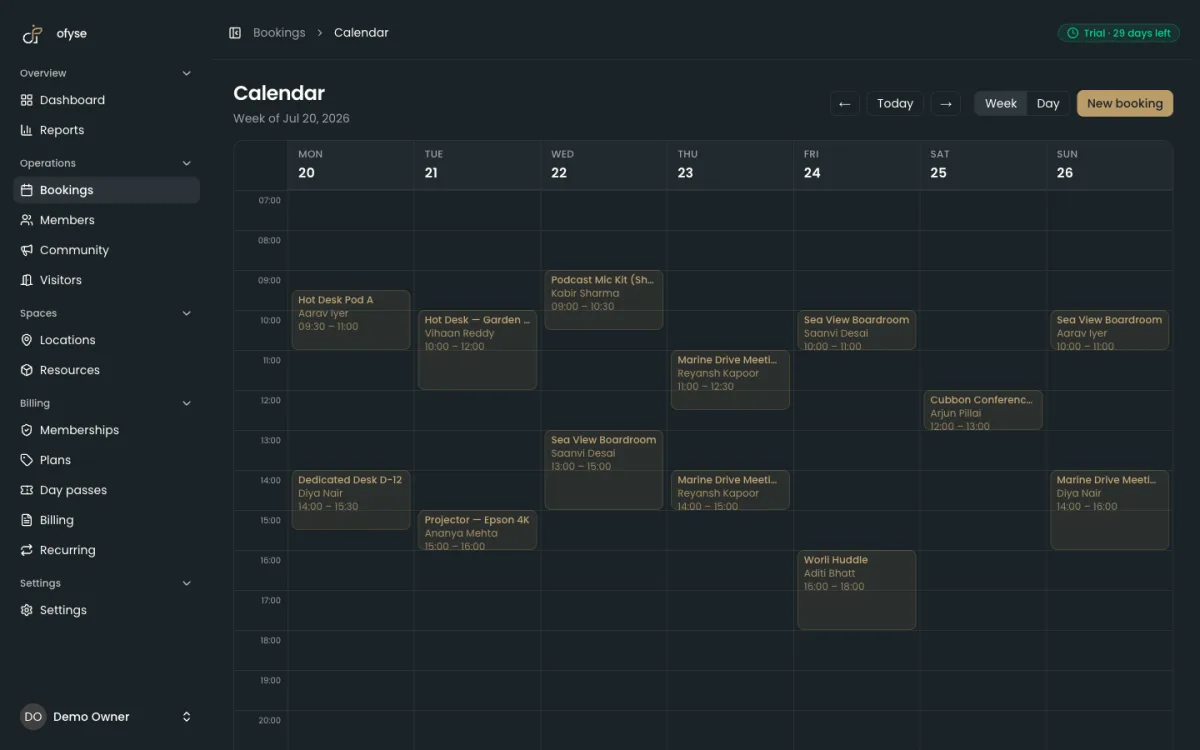
Real-time availability. Everyone who can book — a member on their phone, a staff member at the desk, a standing weekly hold — has to see the same calendar, updated the moment anything changes. Availability that lags is worse than no calendar at all, because it looks authoritative while being wrong.
Conflict detection that actually holds. The hard case is two people booking the same room in the same second. A calendar that only reads availability before writing will let both through, and now you have an argument in the corridor. What you want is a system that locks the slot while it writes the booking, so the second request loses cleanly and is told the room is gone. If a room type has more than one unit — four identical huddle rooms sold as one pool, say — the software should count units, not just flip a yes/no.
Rules, enforced by the software. A shared calendar is only half the job. The other half is the policy layer: when a room can be booked, for how long, with what notice, and what happens when someone cancels. If those rules live in a staff member's head, they hold until that person is on leave. Good software applies them automatically — bookable hours so a room is not reservable at 3am when you close at 7, recurring rules for the standup that always takes Room 2 at 10:00, check-in to confirm a booked room is actually used, and reminders to cut no-shows before they happen.
Booking rules: buffers, duration limits and cancellation policies
Rules are how you stop a shared room from being quietly abused. A handful are worth setting deliberately rather than leaving to goodwill.
| Rule | What it does | What it protects |
|---|---|---|
| Buffer between bookings | Inserts a gap after each meeting | Turnover, cleaning, and back-to-back overruns |
| Minimum duration | Sets a floor on slot length | Stops ten-minute holds fragmenting the day |
| Maximum duration | Sets a ceiling on slot length | Stops one member camping the boardroom all day |
| Bookable hours | Limits when a room can be reserved | Keeps bookings inside staffed, open hours |
| Cancellation policy | Sets a notice window and what happens to the charge | Recovers freed slots; makes no-shows carry a cost |
The buffer is the rule most spaces skip. Fifteen minutes between meetings lets a room clear, reset, and get cleaned, and it absorbs the meeting that runs five minutes long without eating into the next booking. Minimum and maximum durations keep a scarce room fairly shared — a floor stops the calendar filling with fragments, a ceiling stops one team monopolising the best room. Bookable hours keep reservations inside the times your space is actually open and staffed.
The cancellation policy is the rule that touches money. Set a notice window — say, free cancellation up to a few hours before — so a room freed early still has a chance of being rebooked. Outside that window, the charge should stand; otherwise a last-minute cancel costs you a slot you can no longer sell. A no-show is the same logic taken to its end: the room was held, so the booking is billed.
In ofyse, each room carries its own bookable hours and recurring rules for standing meetings, with real-time conflict detection under all of it. Cancel a booking before it ends and any credits it drew return to the member's balance, and the booking stops being billable; a no-show keeps its hold and its charge rather than quietly vanishing. The same rules apply whether the booking came from a member or the front desk, so behaviour is consistent no matter who made the reservation.
Charging for room time: credits versus paid bookings
Money moves through a meeting room two ways, and most spaces use both.
A paid booking is the simple case: the room has a per-hour price, you book two hours, you pay for two hours. It is the right model for walk-ins, non-members, and premium rooms you want to meter directly.
Included credits are how membership plans bundle room time — "ten hours of meeting room a month." The member draws that allowance down as they book and only pays when they run past it. Credits reward membership and smooth demand, but they introduce a reconciliation risk: if the allowance lives in one place and the bookings in another, month-end becomes detective work. Which hours were included? Which were billable? Was the overage ever actually invoiced?
The fix is to make the booking, the credit draw-down, and the invoice the same transaction. In ofyse a membership credit is an hour, and only an hour-priced booking can spend one. When a member books an hour-priced room, the booking draws down their balance first; any time beyond the balance is priced at the room's per-hour rate and flows onto an invoice with the correct tax already applied. Cancel a booking and the credits return to the member's balance; a no-show keeps the hold and the charge. Non-members simply pay the hourly rate. Because bookings and billing are one system, there is no separate ledger to square at month-end — every charge stays attached to the booking that created it, ready for a clean invoice, a credit note if you need to correct it, or automatic dunning if the payment fails.
How generous each plan's allowance should be is a pricing decision worth making deliberately; the trade-offs sit alongside desk and membership tiers in our guide to coworking membership pricing.
Room time is a taxable supply, so build tax into the price rather than bolting it on. In India, coworking services are generally treated as a supply of service with GST commonly cited at 18%, and the SAC often quoted is 997212 — confirm both with your accountant. In the UK the standard VAT rate is 20%, applied per line item once your turnover passes the current registration threshold. This is general information, not tax or legal advice; rates, thresholds and codes change, so confirm your own treatment with a qualified accountant.
Member self-service versus front-desk booking
Who makes the booking changes what the software has to do.
Member self-service lets members book their own rooms from a portal or app. It removes interruptions from the front desk, lets bookings happen at any hour, and lets members see their own credit balance and history. The catch is that a member is not going to read your policy — so whatever rules you set have to be enforced by the software, not by a staff member eyeballing the calendar.
Front-desk booking is staff booking on someone's behalf: walk-ins, phone reservations, members who would rather ask, and the edge cases — comping a room for a prospect, overriding a rule, sorting out a clash. The desk also owns check-in, confirming that a booked room was actually used, which is what turns "booked" into real utilisation data.
Nearly every space runs both, and the failure mode is the same one that plagues any calendar: the two views drift apart. The only reliable fix is that both write to a single calendar, so a member's self-service booking and a staff-entered walk-in are checked against each other the moment either is made.
In ofyse, members book through a white-label member portal — installable as an app via the PWA — while staff book from the same live calendar and handle manual check-in at the desk. Both write to one source of truth, so self-service and front-desk bookings cannot collide. Front-desk visitor check-in and a member directory sit in the same workspace, so the person on the desk is not switching between tools to greet a guest and free up a room.
How ofyse handles rooms, conflict detection and billing in one workspace
The value is in the join: when the calendar, the rules, and the invoice are one system, a booking becomes revenue without anyone copying it across.
- One live calendar for meeting rooms, dedicated desks, hot desks, equipment and day passes, with real-time conflict detection that counts bookable units rather than a single yes/no.
- Booking rules applied automatically — bookable hours per room, recurring rules for standing meetings, manual check-in, and automatic reminders.
- Room charging both ways — per-hour paid bookings for walk-ins and non-members, and membership credits drawn down first with any overage billed, returned to the member when a booking is cancelled and held on a no-show.
- Billing that reconciles itself — the room charge lands on an automated invoice, with recurring invoices, credit notes, dunning and clean PDF invoices, always tied back to the booking that generated it.
- Payments per market — Stripe, Razorpay and GoCardless, covering cards, UPI, NetBanking and bank direct debit, in INR, GBP, USD and EUR.
- Tax done properly — GST-correct invoices with HSN/SAC handling for India, and VAT applied per line item for the UK.
Meeting rooms are one resource on that calendar; the same system runs your hot desks and dedicated desks on the same conflict-checked grid, and both sit inside the wider operation covered in our guide to running a coworking space. You can see the booking, billing and payment modules in one place on the features overview.
Pricing is published — from $129 to $749 per location per month depending on active members, with enterprise pricing above that — with a 30-day free trial and no card required, so you can set up your rooms, rules and room credits and run a real booking through to a paid invoice before you commit. See what is included on the pricing page.
Frequently asked questions

Run your space the modern way
Bookings, members, memberships and billing in one workspace. Start a 30-day free trial — no card required.